

Every growing business reaches a point where spreadsheets and generic apps stop keeping up. At that moment you face a big decision: buy an off-the-shelf software product, or build custom software designed around how your business works?
Neither option is always right. This guide explains the real trade-offs in cost, speed, flexibility and ownership, so you can choose with confidence.
What Is Off-the-Shelf Software?
Off-the-shelf software is a ready-made product sold to many businesses, usually as a monthly subscription. Examples include accounting tools, CRMs, project management apps and e-commerce platforms. You sign up, configure settings and start using it, often within days.
What Is Custom Software?
Custom software is built specifically for your business: your workflows, your data and your customers. It might be an internal operations dashboard, a customer portal, a booking system, a mobile app, or integrations that connect the tools you already use.
The Advantages of Off-the-Shelf Software
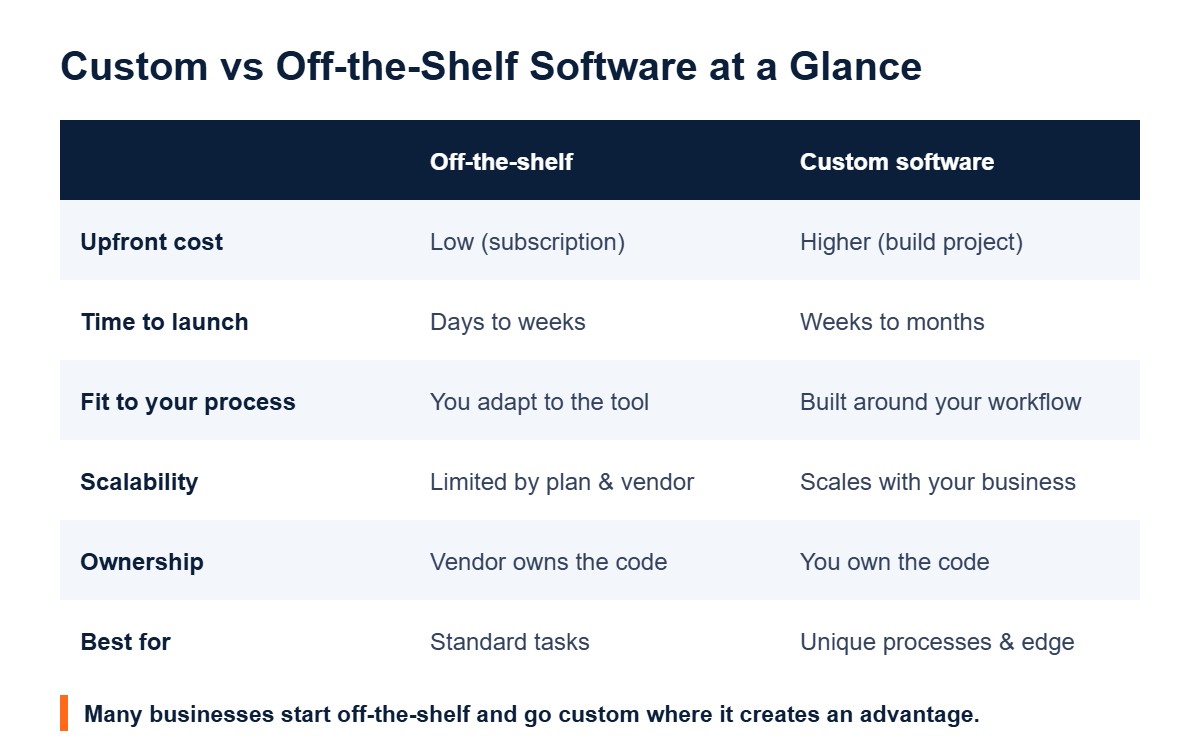
- Lower upfront cost. You pay a subscription instead of funding a development project.
- Fast to launch. Most tools can be running in days or weeks.
- Proven and supported. Popular products are tested by thousands of users and include vendor support and updates.
- Large ecosystems. Many products offer integrations, templates and community help.
The Limitations of Off-the-Shelf Software
- You adapt to the tool. Your team changes its process to fit the software, not the other way round.
- Paying for features you don’t use, while still missing the ones you need.
- Rising costs at scale. Per-user pricing can grow quickly as your team expands.
- Vendor lock-in. Price changes, discontinued features or data export limits are outside your control.
- Integration gaps. Data often ends up split across several disconnected apps.
The Advantages of Custom Software
- Built around your workflow, removing manual work and workarounds.
- A competitive edge. A unique customer experience or internal process competitors cannot simply buy.
- You own it. No per-seat fees for the core system, and full control of your code and data.
- Scales with you. New features are added when your business needs them.
- Connects everything. Custom integrations can link your CRM, website, inventory and accounting into one flow.
The Limitations of Custom Software
- Higher upfront investment for discovery, design, development and testing.
- Longer timeline before launch, often weeks to months depending on scope.
- Ongoing maintenance. Hosting, security updates and improvements need a plan and a budget.
- Depends on the right partner. Quality varies widely between developers.
How to Decide: 5 Questions to Ask
- Is this process standard or unique? Payroll and email are standard, so buy. A process that sets you apart may be worth building.
- How much time does the current workaround cost? Add up the hours your team spends on manual steps each month.
- What will subscriptions cost in three years as your team and usage grow?
- How important is owning the data and code?
- Can you start small? A minimum viable product (MVP) lets you test a custom idea with a smaller first investment.
The Hybrid Approach Most Businesses Use
You rarely have to choose all or nothing. Many businesses use off-the-shelf tools for standard functions, then add custom software where it creates the biggest advantage: a customer portal, an automated quoting tool, or integrations that connect existing apps. This keeps costs under control while removing the bottlenecks that slow growth.
The same thinking applies to websites. A template can work for a simple brochure site, while growing brands often need a custom-built website or a tailored e-commerce store. Our guide to small business website design explains those options in more detail.
What to Look for in a Software Development Partner
- A discovery phase that maps your workflow before any code is written.
- Clear scope, milestones and a fixed or capped budget for each phase.
- Regular demos so you see progress early.
- Your ownership of the code, accounts and data.
- A support and maintenance plan after launch.
Many businesses also start smaller, with custom AI tools and automations that connect the off-the-shelf software they already use. See our AI tools and automation services or our guide to business process automation examples.
Talk to RankVyn About Your Project
RankVyn builds custom web applications, mobile apps and integrations for growing businesses through our software and app development services. We start by understanding your process, then recommend whether to buy, build or combine both. Contact us for a free consultation.
Frequently Asked Questions
Is custom software worth it for a small business?
It is worth it when a unique process, heavy manual work or growing subscription costs are holding the business back. For standard tasks, off-the-shelf tools are usually the better value.
How long does it take to build custom software?
A focused MVP can take several weeks, while larger platforms can take several months. The timeline depends on features, integrations and testing.
Can custom software integrate with tools I already use?
Yes. Most modern tools offer APIs, so custom software can connect to your CRM, accounting, e-commerce and marketing platforms.
Who owns custom software?
With a good development agreement, you own the code and data. Always confirm ownership in the contract before the project starts.
1 Comment